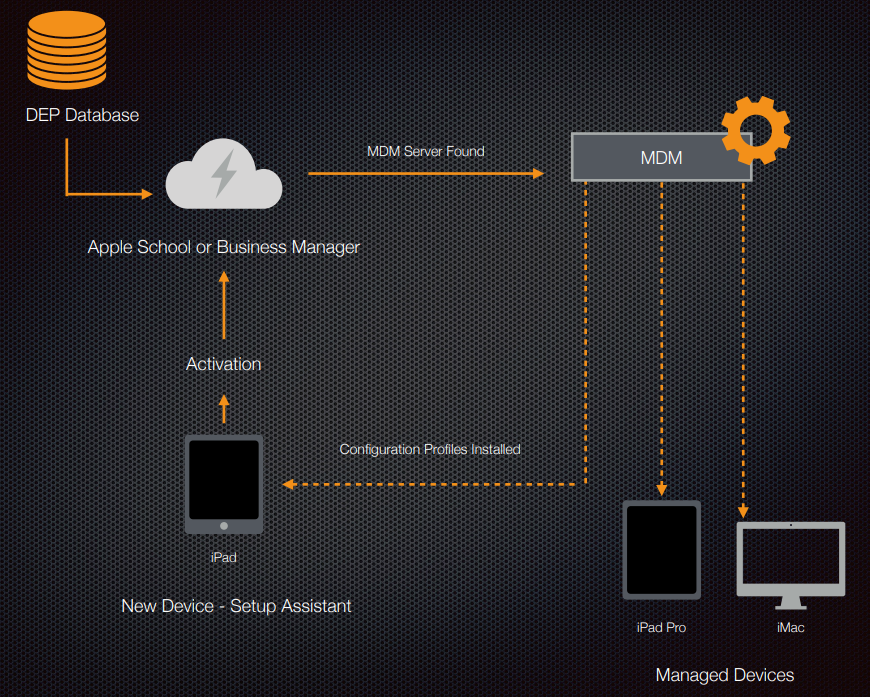
Device activation on the new iPad. When we go through the setup assistant and it goes through hello screen and you join wifi, it will at that time attempt to activate the device. When it does, it actually contacts Apple School Manager / Apple Business Manager, whichever you are using. And it checks to see if the device is in DEP database. If it is, it determines what MDM server its connected to the MDM, the MDM checks to see if there’s configuration profiles and other settings available for that specific device. And if there is, it then pushes those down to the device at the time of activation, once its connected just like the other 2 devices (iPad Pro and iMac), once its been connected to the MDM through activation process, all the changes that you subsequently make on the MDM then automatically pushed out to those devices and change it on those endpoints as long as they have access to that MDM server, which is typically just via a standard web connection.
MDM Server Assignment
MDM Server Settings –> Upload public key that been generated by MDM server. Once its uploaded, you will be able to generate new server token from Apple business Manager to be uploaded to MDM server.
Apple Business Manager can have multiple MDM server endpoints:
- Apple configurator
- Intune MDM server (cross platform MDM)
- Mosyle MDM server (apple devices only MDM)
Designing Mobile program design roadmap in MDM is first thing to do, here is some of sample: